Core Concepts
Fusionize is a distributed, event-driven Business Process Management System (BPMS) that natively integrates AI as a first-class participant in business workflows.
What is Fusionize?
At its heart, Fusionize is a Workflow Orchestration Engine that manages the lifecycle of business processes. It separates the definition of a process (What needs to be done?) from the execution (Who does it and when?).
Think of it as a conductor of an orchestra—it doesn't play the instruments itself, but coordinates when each musician (component) should perform their part.
Core Architecture
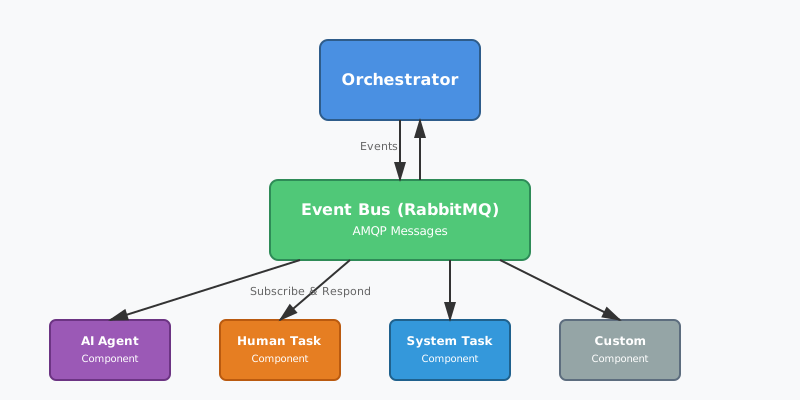
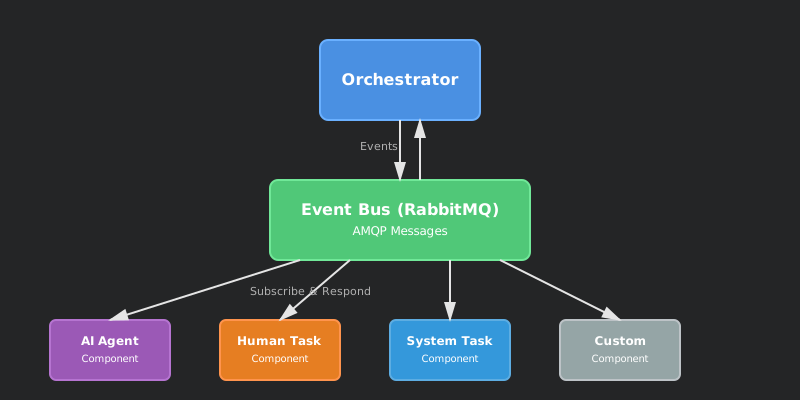
Fusionize operates as a distributed orchestrator that coordinates a network of workflow nodes through asynchronous messaging.
High-Level Architecture
Key Components
- Workflow Definition: Workflows are defined declaratively using YAML or as a Kubernetes Custom Resource (CRD)
- Orchestrator: The central coordination engine that manages workflow execution
- Event Bus (RabbitMQ): Enables asynchronous, distributed communication via AMQP
- Components: Reusable units of logic executed by AI, humans, or systems
- Storage (MongoDB): Provides flexible persistence for workflow state and context
Design Principles
⚡ Event-Driven Execution
Every transition in a workflow is triggered by domain or system events, creating an asynchronous and highly scalable orchestration engine. The orchestrator never blocks waiting for work to complete.
🤖 AI-Native
AI is a first-class participant in Fusionize, not just an external plugin. AI agents can:
- Make autonomous decisions
- Perform complex actions
- Trigger human collaboration when needed
- Learn from workflow context
📈 Scalable & Reliable
The architecture leverages enterprise-grade technologies:
- RabbitMQ: Handles distributed message flow with guaranteed delivery
- MongoDB: Provides flexible, schema-less persistence
- WebSocket: Enables real-time coordination and updates
🔒 Secure by Design
Security is integral to every layer:
- RSA-based signatures for secure communication
- Keycloak for robust identity and access management
- Fine-grained authorization at the component level
🧩 Extensible
Easily extend the system by adding new node types and components using a pluggable Spring Boot starter API.
Understanding Workflows
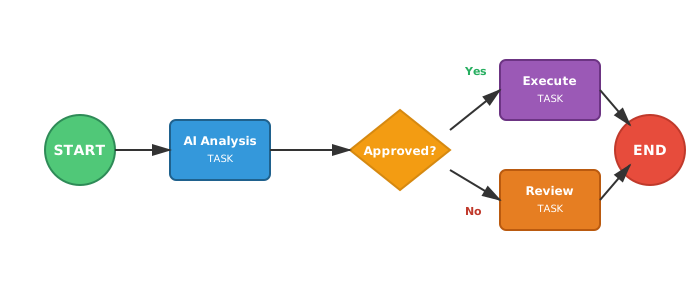
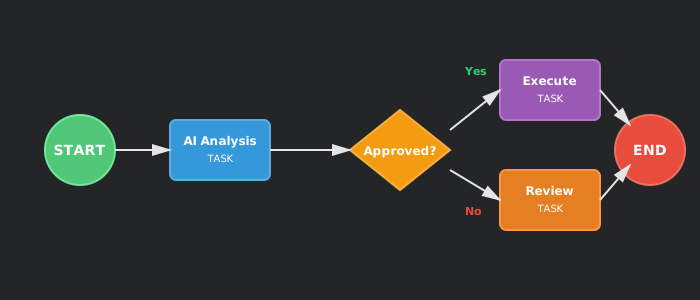
A workflow is a directed graph that defines how work flows through your business process.
Workflow Graph Example
Node Types
Each node in the workflow graph serves a specific purpose:
- START: The entry point that triggers a new workflow execution
- TASK: Represents a unit of work (AI analysis, human approval, system action)
- DECISION: A branching point that evaluates conditions to choose the next path
- WAIT: Pauses execution until a condition is met or an event occurs
- END: Marks successful completion of a workflow path
Components: The Logic Behind Nodes
While a Node defines where a step happens in the graph, a Component defines what actual logic executes.
Key Characteristics:
- Reusable: A single component (e.g., "Send Email") can be used by multiple nodes across different workflows
- Actor-Based: Components are assigned to actors (
SYSTEM,AI,HUMAN) that define who performs the work - Decoupled: Components don't know about the workflow graph—they just receive input and produce output
Workflow Context: The Shared Memory
Data flows through the workflow via the Workflow Context, which acts as shared memory for the execution.
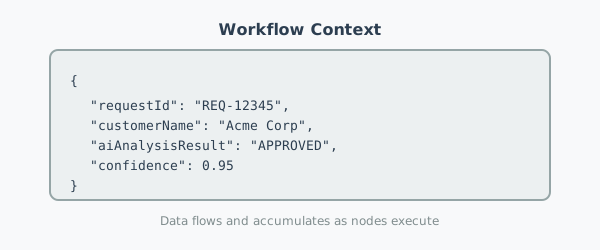
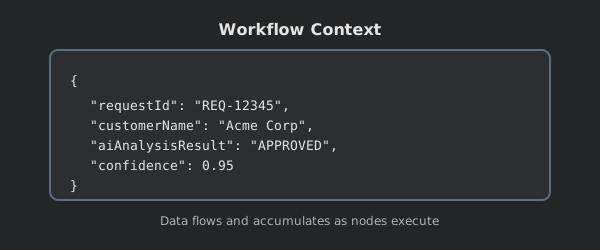
How it works:
- Initial data enters when the workflow starts
- Each node reads from the context to get its input
- After execution, the node's output is merged back into the context
- Downstream nodes can use this accumulated data for decisions and actions
The Event-Driven Execution Model
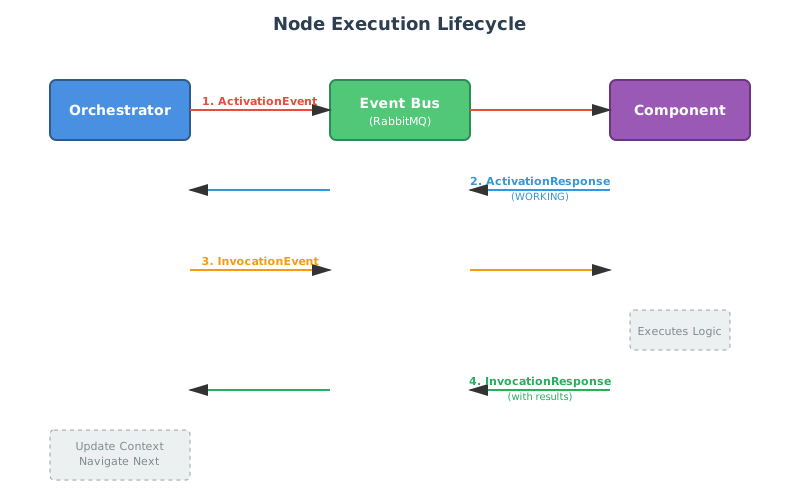
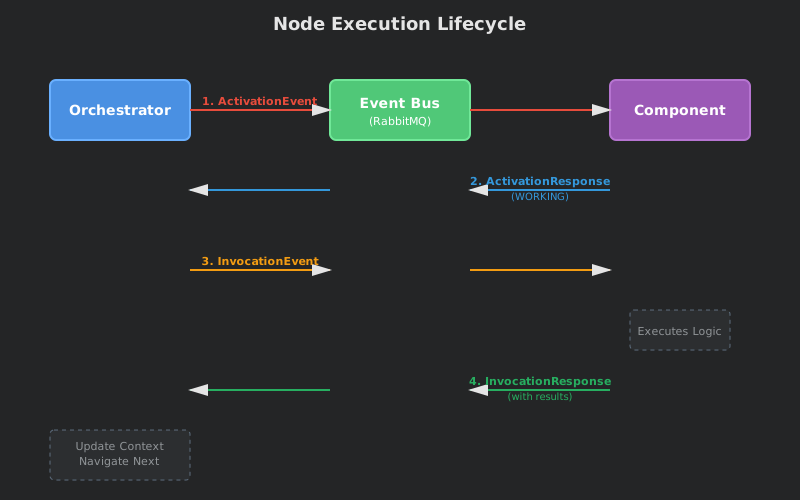
Fusionize's power comes from its asynchronous, event-driven architecture. The orchestrator never directly calls components—instead, it publishes events to an event bus.
Execution Flow
The Two-Phase Execution
Every node execution follows a two-phase pattern:
Phase 1: Activation
Before work begins, the component must be activated:
- Orchestrator determines a node is ready to execute
- Sends an ActivationEvent via the event bus
- Component Runtime intercepts and prepares the environment (allocate resources, spin up AI agent, etc.)
- Responds with
WORKING(ready to proceed) orWAITING(needs external input)
Phase 2: Invocation
Once activated, the actual work begins:
- Orchestrator sends an InvocationEvent with input data from the workflow context
- Component executes its core logic (call LLM, query database, prompt human, etc.)
- Sends InvocationResponse back with execution results
- Orchestrator updates the workflow context and navigates to the next node
Why This Matters
This event-driven approach provides:
- Scalability: Thousands of workflow executions run in parallel without blocking
- Resilience: If a component crashes, the event can be retried from the queue
- Flexibility: Components can run anywhere—different servers, containers, or cloud regions
- Observability: Every step is an event that can be logged, monitored, and traced
Navigation: Moving Through the Graph
After a node completes, the Navigator determines what happens next:
- Analyzes the workflow graph structure
- Evaluates decision rules against the current workflow context
- Creates new execution records for the next node(s)
- Triggers their activation, repeating the cycle
For DECISION nodes, the navigator evaluates conditions like:
context.aiAnalysisResult == "APPROVED"→ go to approval pathcontext.riskScore > 0.8→ go to human review path
Summary
Fusionize orchestrates complex business processes through:
- Declarative workflow definitions as directed graphs of nodes
- Event-driven execution where components work asynchronously
- Shared workflow context that accumulates data as execution progresses
- Two-phase activation and invocation for reliable component coordination
- Intelligent navigation that routes execution based on context and rules
This architecture enables AI, humans, and systems to collaborate seamlessly in scalable, reliable business processes.